
Students who have completed the West African Senior School Certificate Examination (WASSCE) can now check their WAEC result online using their smartphone, tablet, or computer. Whether you are checking your result for the first time or need help finding the correct portal, this guide explains everything you need to know.
How to Check My Result Online WAEC
If you’ve been asking, “How can I check my result online WAEC?”, the process is simple:
- Open the official WAEC Result Checker portal.
- Enter your examination number.
- Select your examination year.
- Choose your examination type.
- Enter your WAEC Result Checker PIN.
- Enter your e-PIN Serial Number.
- Click Submit.
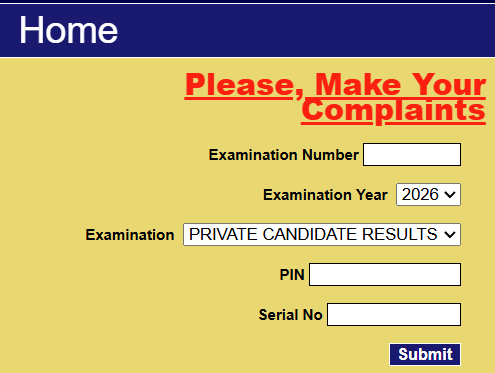
Your result will be displayed immediately if it has been released.
Why Can’t I Check My WAEC Result?
If you’re unable to access your result, one of these issues may be responsible:
- Incorrect Examination Number
- Wrong Examination Year
- Invalid WAEC Result Checker PIN
- Incorrect Serial Number
- Poor internet connection
- Result not yet released
- PIN usage limit has been exhausted
Double-check your information before trying again.
I want to see my results please